
Home
Home
  1. πŸ“€ Webhooks
  • πŸš€ Getting Started
  • πŸ”Ž Screening API
    • Overview
    • Blacklist Matching Logic
    • πŸ“‘ Endpoints
      • Blockchain Analysis
      • Individuals Analysis
      • Organizations Analysis
      • Screening Entities Summary Analysis
      • Create BlackList
      • Get All BlackList Records
      • Get Blacklist Record by ID
      • Delete Blacklist Record by ID
      • Update Blacklist Record by ID
      • Update Blacklist Settings Account
  • 🌊 Flow API
    • Overview
    • Flow Step: Identity Verification
    • Flow Step: Onboarding Individual
    • Flow Step: Onboarding Organization
    • πŸ“‘ Endpoints
      • Authentication token
      • Get Flow Instances
      • Get Flow Instance By Id
      • Get File from Flow Instance
      • Identity: Get Details
      • Identity: Get Files
      • Identity: Update Status
      • Onboarding: Get Details
      • Onboarding: Get File
      • Onboarding: Get Multiple Files
      • Onboarding: Update Status
      • Onboarding: Get Entity by document number
      • Onboarding: Get Entity List by document number
    • πŸ“€ Webhooks
      • Overview
      • Flow
      • Identity Verification
      • Onboarding Individual
      • Onboarding Organizations
      • Identity Verification by Onboarding
  • πŸ’ΈTransaction Screening API
    • πŸ”‘ Authentication
    • Overview
    • Transaction Analysis
    • Monitoring & History
    • Document Types
    • Supported Currencies
    • Diagram
    • πŸ“€ Webhooks
    • πŸ“‘ Endpoints
      • Submit Transaction
      • List Transactions
      • List Document types
      • List Cryptocurrencies
      • Register remitter
      • Register Beneficiary
  • πŸ“‚ Resources
    • Concept Details
    • Enum Validation
Home
Home
  1. πŸ“€ Webhooks

Overview

The Flow API provides two types of webhooks to help you stay updated on the progress and completion of verification and onboarding flows.

1️⃣ General Flow Webhooks#

These webhooks are configured at the flow level and notify you when a flow has been fully completed, including all the associated services.
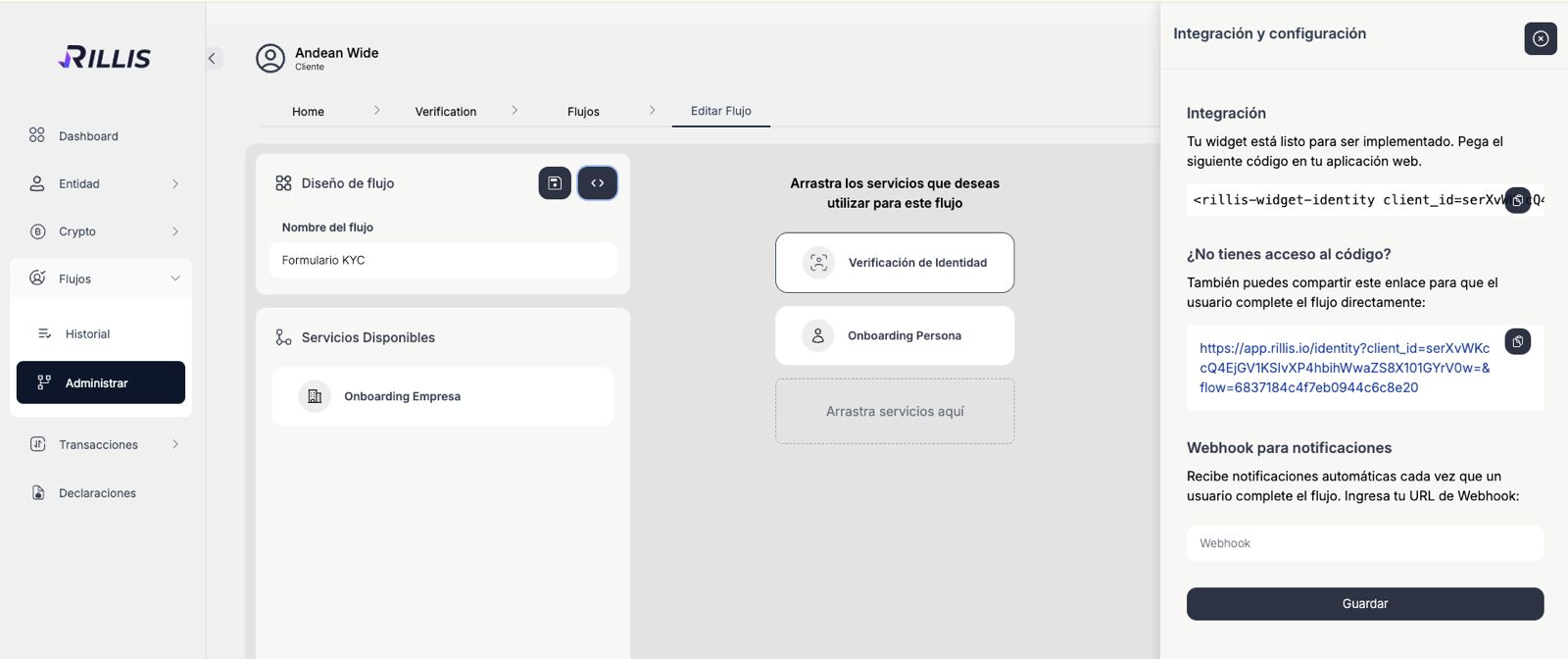
You can configure these webhooks when creating or editing a flow by clicking the "<>" button (with the tooltip "Integrate SDK") as shown in the following image:
General Flow Webhooks
Here, simply enter the URL of your webhook endpoint and click Save. Once configured, Rillis will automatically send notifications to this URL every time a user completes the flow.

2️⃣ Step-by-Step Webhooks#

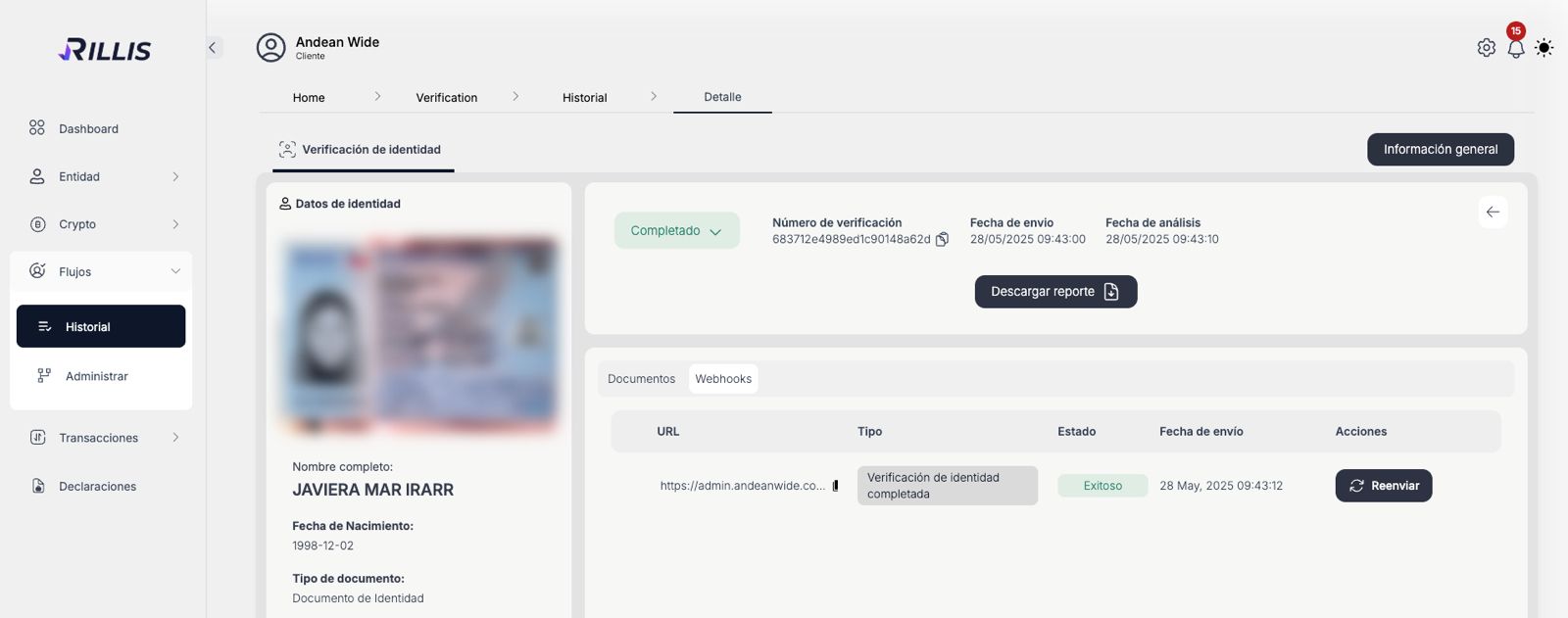
If you want to receive more granular updates as the user progresses through the different steps of the flow (such as onboarding forms or document verification), you can enable step-specific webhooks.
These can be configured by navigating to the "Webhook" tab within each flow. This way, you can capture events as they occur in real-time.
Step Webhooks Example

Summary Table of Flow API Webhooks#

Webhook TypeDescriptionStep
FLOW_COMPLETEDTriggered when a flow and all related services are fully completed.Flow completion
FLOW_REJECTEDTriggered when a flow is rejected (e.g., final decision of no approval).Flow completion
VERIFICATION_IDENTITY_REJECTEDTriggered when an identity verification is rejected.Identity Verification
VERIFICATION_IDENTITY_COMPLETEDTriggered when an identity verification is approved.Identity Verification
VERIFICATION_IDENTITY_UPDATEDTriggered when an identity verification is manually updated.Identity Verification
ONBOARDING_FORM_INDIVIDUAL_COMPLETEDTriggered when an individual form is completed (pending review).Onboarding Individual
ONBOARDING_FORM_INDIVIDUAL_REJECTEDTriggered when an individual onboarding form is rejected.Onboarding Individual
ONBOARDING_FORM_COMPANY_COMPLETEDTriggered when a company form is completed (pending or approved).Onboarding Company
ONBOARDING_FORM_COMPANY_REJECTEDTriggered when a company onboarding form is rejected.Onboarding Company

How Webhooks Work#

Whenever an event occurs, Rillis sends a POST request to your configured webhook URL containing the event data in JSON format. The payload typically includes:
type: The type of the event (e.g., FLOW_COMPLETED).
timestamp: The time when the event was triggered.
data: The specific details of the event.
Your webhook endpoint must respond with a 200 HTTP status code to confirm receipt. If Rillis does not receive this response, it will automatically retry the notification several times.

πŸ” Securing Your Webhooks (Signature Validation)#

To ensure that the received information is authentic, unaltered, and truly comes from Rillis, you can configure a Webhook Key in your Flow settings. This key is used to sign the data sent in the webhook payload via HMAC-SHA256.
When enabled, Rillis includes the following custom HTTP headers in every request:
x-signature: The HMAC-SHA256 signature of the payload.
x-timestamp: The Unix timestamp (in seconds) when the signature was generated.

How to Validate the Signature (Step-by-Step)#

Step 1: Extract Headers and Payload#

Retrieve the x-signature and x-timestamp from the request headers, and capture the raw JSON body.

Step 2: Sort the Payload Recursively#

Crucial Step: To guarantee a deterministic result, you must recursively sort the payload object keys alphabetically before stringifying it.

Step 3: Recreate the Signature#

Concatenate the timestamp and the stringified sorted payload using a dot (.), then hash it using your secret webhook_key.

Step 4: Compare Signatures Safely#

Use a timing-safe comparison to prevent timing attacks. Additionally, validate the timestamp to prevent replay attacks.

Security Best Practices#

1.
Never expose your webhook_key: Ensure it is never visible in client-side code, server logs, or error responses.
2.
Use environment variables: Always store the webhook_key securely on your server using environment variables (e.g., .env files).
3.
Validate timestamps: Always check the x-timestamp header against your server's current time to prevent replay attacks (a 5-minute window is recommended).
4.
Use safe comparison: Employ timingSafeEqual (or your programming language's equivalent) when comparing signatures to prevent timing attacks.
5.
Implement rate limiting: Protect your webhook endpoint infrastructure by limiting the number of requests it can receive in a given timeframe.
Modified atΒ 2026-02-23 17:57:18
Previous
Onboarding: Get Entity List by document number
Next
Flow
Built with