
Home
Home
  1. 📤 Webhooks
  • 🚀 Getting Started
  • 🔎 Screening API
    • Overview
    • Blacklist Matching Logic
    • Blockchain Analysis
      POST
    • Individuals Analysis
      POST
    • Organizations Analysis
      POST
    • Screening Entities Summary Analysis
      POST
    • Create BlackList
      POST
    • Get All BlackList Records
      GET
    • Get Blacklist Record by ID
      GET
    • Delete Blacklist Record by ID
      DELETE
    • Update Blacklist Record by ID
      PATCH
    • Update Blacklist Settings Account
      PATCH
  • 🌊 Flow API
    • Overview
    • Flow Step: Identity Verification
    • Flow Step: Onboarding Individual
    • Flow Step: Onboarding Organization
    • 📡 Endpoints
      • Authentication token
      • Get Flow Instance
      • Get File from Flow Instance
      • Identity: Get Details
      • Identity: Get Files
      • Identity: Update Status
      • Onboarding: Get Details
      • Onboarding: Get File
      • Onboarding: Get Multiple Files
      • Onboarding: Update Status
    • 📤 Webhooks
      • Webhooks Overview
      • Flow
      • Identity Verification
      • Onboarding Individual
      • Onboarding Organizations
      • Identity Verification by Onboarding
  • 💸 Transaction API
    • 🔑 Authentication
    • Overview
    • Transaction Analysis
    • Transaction Status
    • Document Types
    • Cryptocurrencies
    • Diagram
    • 📤 Webhooks
  • 📡 Endpoints
    • Create operation
    • Get operation
    • Get valid document types
    • Get valid coins
  • 📂 Resources
    • Concept Details
    • Enum Validation
Home
Home
  1. 📤 Webhooks

Webhooks Overview

The Flow API provides two types of webhook to help you stay updated on the progress and completion of verification and onboarding flows:

1️⃣ General Flow Webhooks#

These webhooks are configured at the flow level and notify you when a flow has been fully completed, including all the associated services.
You can configure these webhooks when creating or editing a flow by clicking the "<>" button (with the tooltip "Integrate SDK") as shown in the following image:
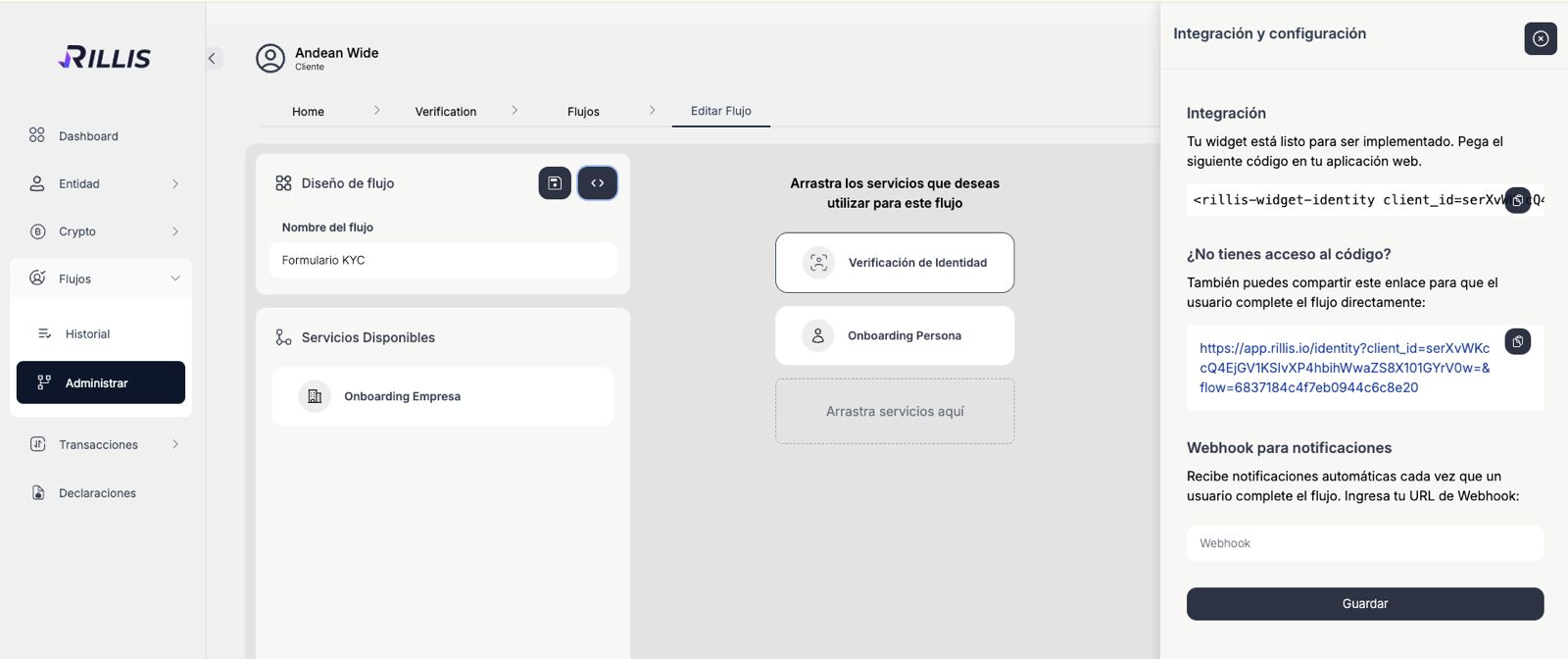
General Flow Webhooks
Here, simply enter the URL of your webhook endpoint and click Save. Once configured, Rillis will automatically send notifications to this URL every time a user completes the flow.

2️⃣ Step-by-Step Webhooks#

If you want to receive more granular updates as the user progresses through the different steps of the flow (such as onboarding forms or document verification), you can enable step-specific webhooks.
These can be configured by navigating to the "Webhook" tab within each flow. This way, you can capture events as they occur in real-time while the user completes each step. For example, in the image we can see the webhooks of the identity verification step.
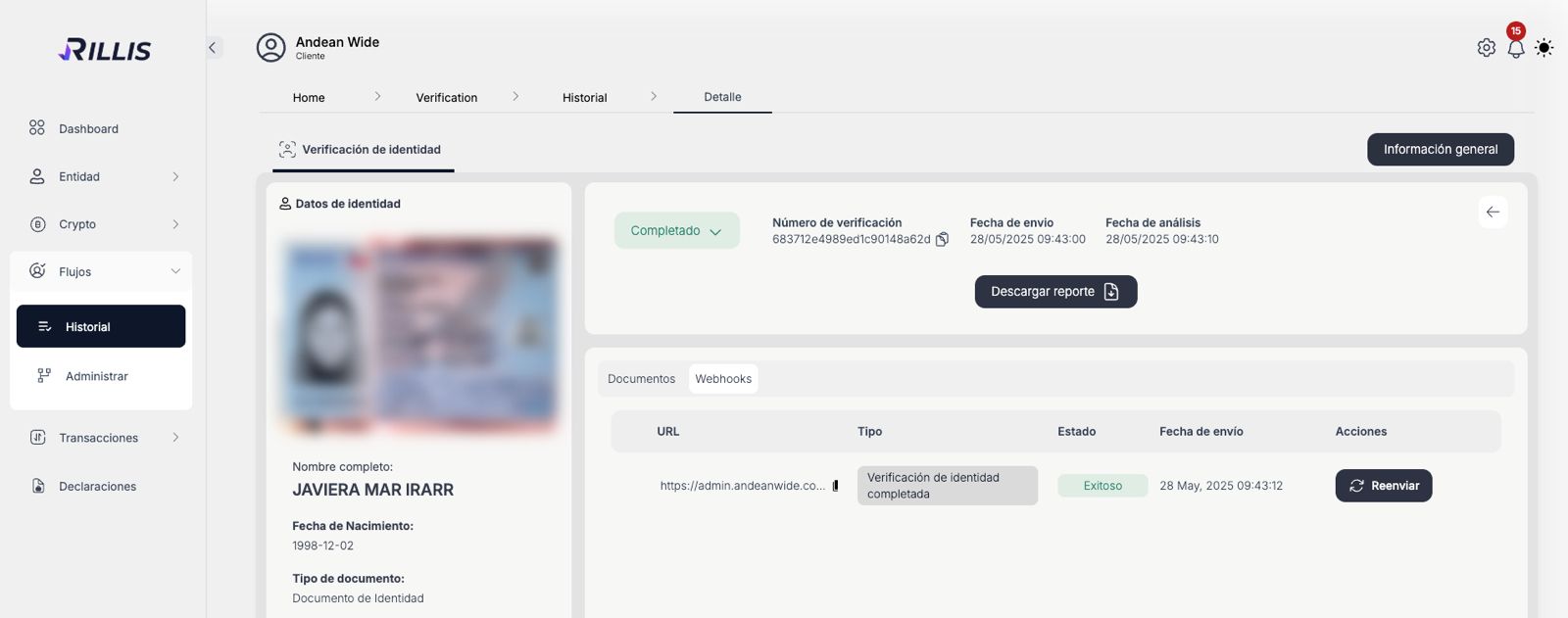
Step Webhooks Example

Summary Table of Flow API Webhooks#

Webhook TypeDescriptionStep
FLOW_COMPLETEDTriggered when a flow and all related services are fully completed.Flow completion
FLOW_REJECTEDTriggered when a flow is rejected (e.g., final decision of no approval).Flow completion
VERIFICATION_IDENTITY_REJECTEDTriggered when an identity verification is rejected.Identity Verification
VERIFICATION_IDENTITY_COMPLETEDTriggered when an identity verification is approved.Identity Verification
VERIFICATION_IDENTITY_UPDATEDTriggered when an identity verification is manually updated.Identity Verification
ONBOARDING_FORM_INDIVIDUAL_COMPLETEDTriggered when an individual onboarding form is completed (pending review).Onboarding Individual
ONBOARDING_FORM_INDIVIDUAL_REJECTEDTriggered when an individual onboarding form is rejected.Onboarding Individual
ONBOARDING_FORM_COMPANY_COMPLETEDTriggered when a company onboarding form is completed (pending review or approved).Onboarding Company
ONBOARDING_FORM_COMPANY_REJECTEDTriggered when a company onboarding form is rejected.Onboarding Company

How Webhooks Work#

Whenever an event occurs (like the completion of a flow or a step update), Rillis sends a POST request to your configured webhook URL containing the event data in JSON format. The payload typically includes:
type: The type of the event (e.g., FLOW_COMPLETED, VERIFICATION_IDENTITY_COMPLETED).
timestamp: The time when the event was triggered.
data: The specific details of the event.
For a complete breakdown of each webhook type and its payload structure, check out the dedicated documentation page for each webhook event.
💡 Note: Your webhook endpoint must respond with a 200 HTTP status code to confirm receipt. If Rillis does not receive this response, it will automatically retry the notification several times to ensure successful delivery.
Modified at 2025-05-29 17:03:55
Previous
Onboarding: Update Status
Next
Flow
Built with